
| Product Documentation
Hybrid Control Panel (v10)
Enabling Password Complexity
HC10 user passwords can effectively be controlled through the password complexity option. Certain restrictions can be enforced on passwords and certain lengths and characters can be required of them for security purposes. Restrictions range from minimum length requirement to alphanumeric character limitations.
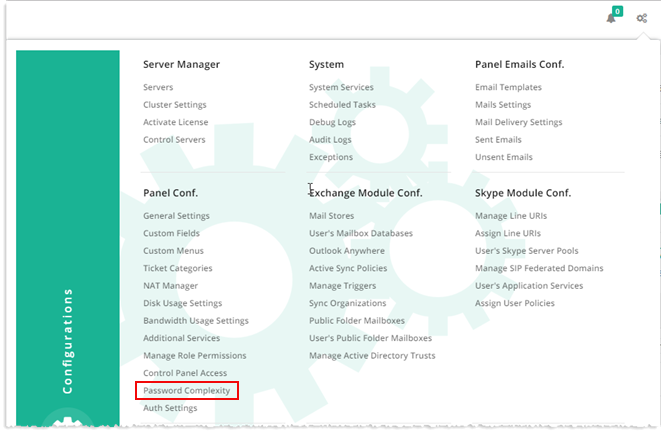
To enable password complexity, from top right corner of your screen, click  and then go to Panel Configuration >> Password Complexity. Select Enable checkbox and modify information as required.
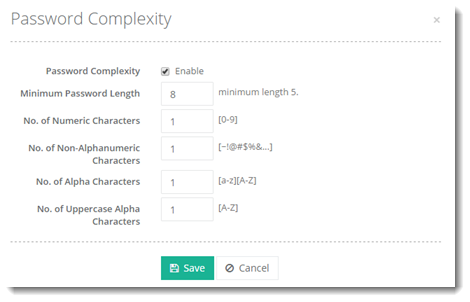
- Minimum Password Length: Password length should be at least the specified number of characters. It cannot be less than 5 characters.
- No. of Numeric Characters: Passwords should contain at least the specified number of numeric characters (0-9).
- No. of Non-Alphanumeric Characters: Passwords should contain at least the specified number of special characters (e.g. !@#).
- No. of Alpha Characters: Passwords should contain at least the specified number of a mix of uppercase and lowercase alphabets ([a-z] [A-Z]).
- No. of Uppercase Alpha Characters: Passwords should contain at least the specified number of uppercase alphabets (A-Z).