
| Product Documentation
Hybrid Control Panel (v10)
Adding an Active Directory Server
Prior to add an Active Directory server, make sure you have enabled the server roles under Cluster Settings. If you have not configured it yet, please configure it now to proceed further.
To add an Active Directory server, specify General Information and click Check Connectivity. Once you are connected successfully, only then you can add an Active Directory server.
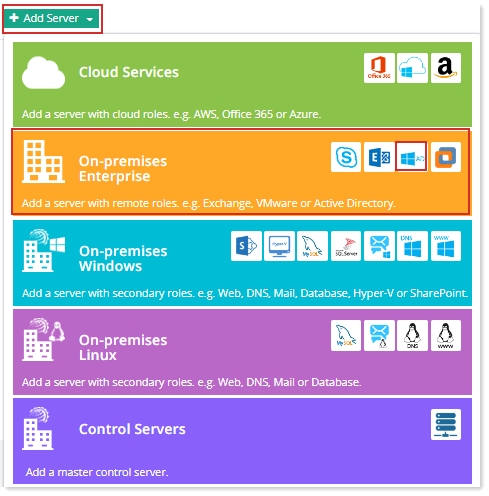
Fields marked in red are required fields and cannot be left empty.
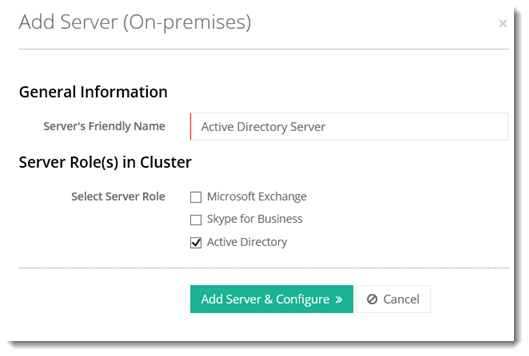
- Server Friendly Name: It is a friendly name of the server being added for your convenience.
- Server Role: Select Active Directory as the server role.
This is a hypothetical server with a Friendly Name, without any physical existence. It only serves as a pointer to the actual AD server. In reality the Control Server communicates with the actual Domain Controller directly via Remote PowerShell.
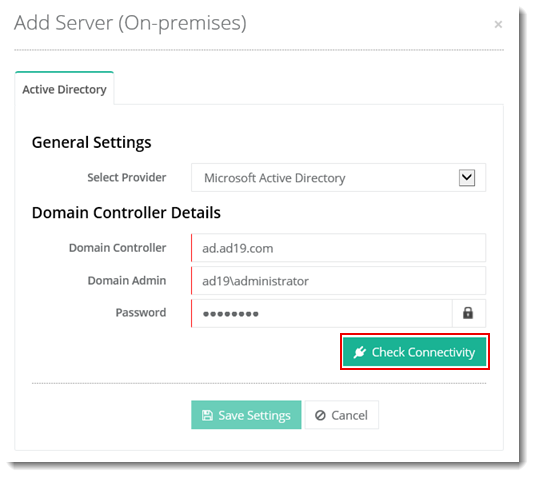
- Select Provider: Select Microsoft Active Directory as the provider.
- Domain Controller: Provide resolvable host name or IP of the Domain Controller.
- Domain Admin: Provide the domain\administrator or an account having equivalent privileges.
- Password: Password for the domain\administrator.
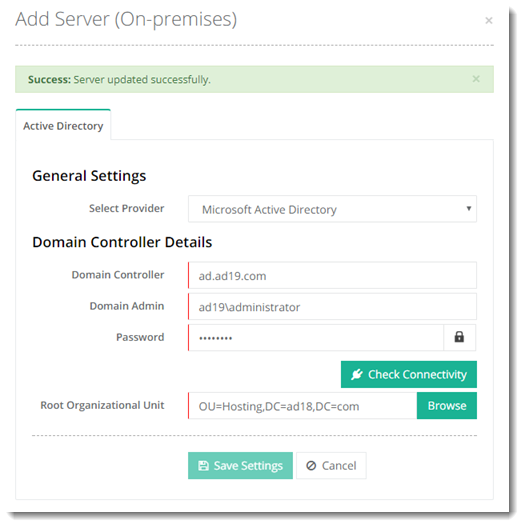
- Root Organizational Unit: The root OU under which the Tenant OUs would lie.