
| Product Documentation
Hybrid Control Panel (v10)
Offering Hosting Controller on Amazon EC2
Hosting Controller allows you to deploy and use its hybrid multi-cloud control panel on Amazon EC2 instances. A pre-built control panel on an EC2 instance not only saves you time and effort but also presents a significant cost reduction. Through Hosting Controller you can manage a wide variety of highly available hosted services on Amazon EC2 instances.
Hosting Controller provides a pre-configured Amazon Machine Image (AMI) that can be used to launch Amazon EC2 instances. The Hosting Controller published AMI can be used to provision any EC2 instance type.
For instructions on how to launch an instance from a Hosting Controller published AMI, see Launching an AWS Marketplace Instance.
- Name: Enter a descriptive name for your instance. The Name field is optional.
- Amazon Machine Image: Choose the Hosting Controller published AMI. It carries a pre-installed copy of Hosting Controller. EC2 Instances launched from this custom AMI will include Hosting Controller software by default. To learn more about AMIs, see Amazon Machine Images.
- Instance Type: Choose the instance type (compute, memory and storage) that best suits your needs. You can launch any EC2 instance type. For details on instance types, see Instance Types.
- Key Pair: Select an existing key pair or create a new key pair to connect to the instance. To learn more about key pairs, see Amazon EC2 Key Pairs.
- Storage: Specify the storage size for the instance.
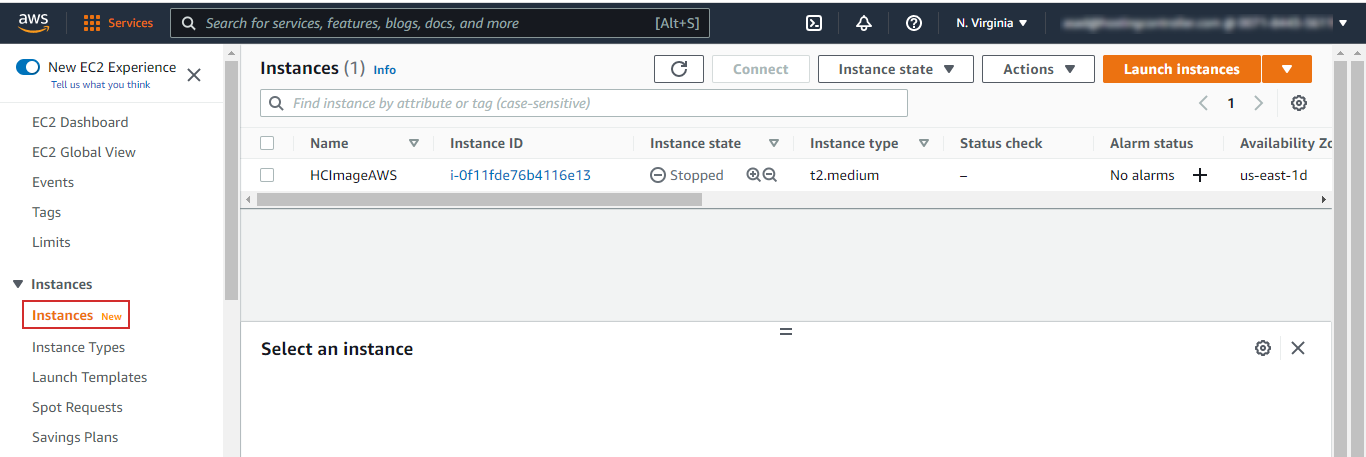
You can view the status and manage all your instances in your EC2 Management Console:
Assigning IP Address
You can assign static IPs to your instance, or the instance can be assigned IPs dynamically. If you wish to associate a static IP address to your instance, obtain an Elastic IP address and assign it to your instance once you create it. The elastic IP address is associated with your AWS account; therefore, you can assign it to your instance at any time.
For more information on fees for using elastic IP addresses, see Amazon EC2 Pricing.
Billing
The Amazon instance is billed on an hourly basis. For Hosting Controller licenses, you will have to Bring Your Own License (BYOL). You will need to purchase and install the Hosting Controller license yourself. You may either move your existing license key to the EC2 instance or you may order a new one by contacting Hosting Controller Sales at sales@hostingcontroller.com.
To learn more about Amazon EC2 Instance usage fees, see Amazon EC2 Pricing.
SQL Server Database
Hosting Controller uses Microsoft SQL Server to host its database. The Hosting Controller AMI contains a pre-configured instance of SQL Server and a backend database. All Hosting Controller data is stored in this database.
Logging in to Hosting Controller
Once the EC2 instance is up and running you can access Hosting Controller on it. To login to Hosting Controller on the EC2 instance follow the steps below:
- Log in to the instance with RDP.
- Find a shortcut for Hosting Controller on the desktop. Launch Hosting Controller through the shortcut.
- The following URL will open in your browser: https://<SERVER_HOSTNAME_OR_IP_ADRESS:8797>
If you want to access Hosting Controller through a domain name, see How to Modify HC Panel Access URL - On the very first login, Hosting Controller will require you to insert any username and password.
Panel admin password can be changed anytime later. To change the password, see How to Reset HC panel login.
- Login to Hosting Controller with the admin credentials (username and password).
Post-install Configuration
To get started with Hosting Controller in minimal possible steps, after login, see our Quick Start Guide.