
| Product Documentation
Hybrid Control Panel (v10)
Configurations
To configure all the panel related settings go to configurations section  from top-right corner of the screen.
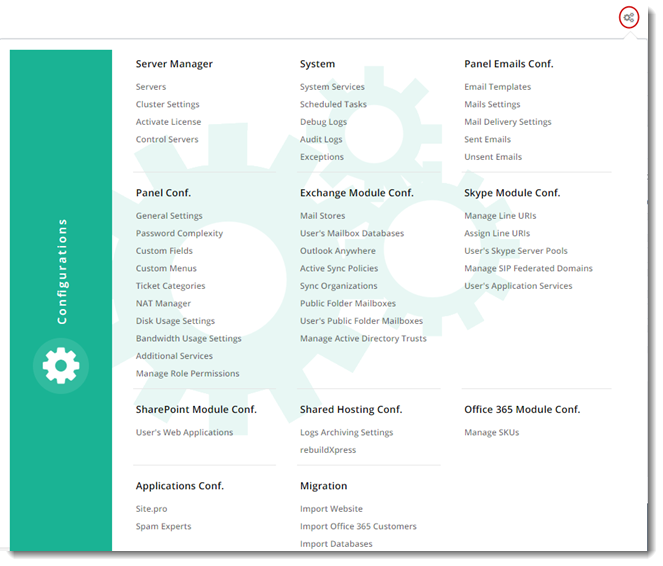
Server ManagerServer Manager allows Global Admin to deal with server related activities. They can view all the existing servers in the panel, add servers, perform configurations for the entire cluster as per their requirements, activate license and reset server credentials when required. |
SystemThis section manages system related operations. Global Admin can start/restart/pause/stop/disable number of services for the selected server, they can manage all kinds of system logs and view occurred exceptions if any. |
Panel Emails ConfigurationSystem Jobs section allows Global Admin to monitor & control all the sent/unsent emails and scheduled tasks in the panel. |
Applications ConfigurationApplications Configurations allow Global Admin to enable and configure third party applications to be used with HC10. |
Exchange Module ConfigurationExchange Module provides absolute management of mail stores and mailboxes. |
Skype Module ConfigurationSkype Module offers complete control and management of Skype related tasks. |
SharePoint Module ConfigurationSharePoint Module offers complete control and management of SharePoint server related tasks. |
Office 365 Module ConfigurationOffice 365 Module offers complete control and management of Office 365 related tasks. |
|
|
Shared Hosting ConfigurationShared Hosting offers complete control and management of shared hosting related tasks. |
|
|
MigrationMigration section allows Global Admin to perform import/transfer of websites, databases and virtual machines |
|
|
Virtualization Module ConfigurationVirtualization Module offers complete control and management of virtualization related tasks in the panel such as managing OS templates, Public and Private IP addresses, Virtual LANs and Web Console Settings. |
|
|
AWS Module ConfigurationAWS Module Configuration section allows Global Admin to configure and manage AWS Buckets. |