
| Product Documentation
Hybrid Control Panel (v10)
Preparing CentOS guest OS template
- Disable CentOS Firewall on OSTemplate: CentOS 7 Firewall should be disabled on OSTemplate. To disable it, follow the steps given below:
- First, stop the FirewallD service using command: sudo systemctl stop firewalld
- In second step, Disable the FirewallD service to start automatically on system boot using this command:sudo systemctl disable firewalld
- Install HC Hyper-V components on CentOS 7 OSTemplate: Follow the instructions given below in order to install HC Hyper-V Components on CentOS 7 Guest OSTemplate.
- For Linux there are 2 versions of HC Hyper-V Components. Choose the one that corresponds to your operating system.
HC Hyper-V Component for 32 bit OS: http://downloads.hostingcontroller.com/utilities/hcvmcomp_x86.tar.gz
HC Hyper-V Component for 64 bit OS: http://downloads.hostingcontroller.com/utilities/hcvmcomp_x64.tar.gz
- ?Once you download, extract the file using the command: tar -xvzf hcvmcomp_x64.tar.gz
- After this run this command: chmod 755 ./install_hcvmcomp.sh
- And then: ./install_hcvmcomp.sh
- For Linux there are 2 versions of HC Hyper-V Components. Choose the one that corresponds to your operating system.
- Install Linux Integration Service (LIS): if you run lsmod | grep hv_ command, it will show that these are installed properly. However, to install the latest updated LIS tools, following steps are required to be run on the OSTemplate in the following sequence:
- Download latest Linux Integration Services from this link: https://www.microsoft.com/en-us/download/details.aspx?id=55106
- The above URL contains ISO image, tar.gz file and PDF document instructions for the installing the latest LIS on Virtual Machine.
After performing all above tasks, CentOS 7 OSTemplate is now ready to be used for provisioning of Virtual Machines via HC10 panel.
-
Install net-tools package: This package is mandatory to be installed on the CentOS Guest OSTemplate. To install the package you can run the following command:
yum install net-tools
-
HC Panel Level Configurations for CentOS OSTemplates: In order to configure CentOS Guest OSTemplate, follow the steps given below:
-
Open HC panel as Global Admin user
-
Navigate to the menu : Configurations >> Virt. Module Conf. >> OSTemplates. Here click on Add OS Template button
-
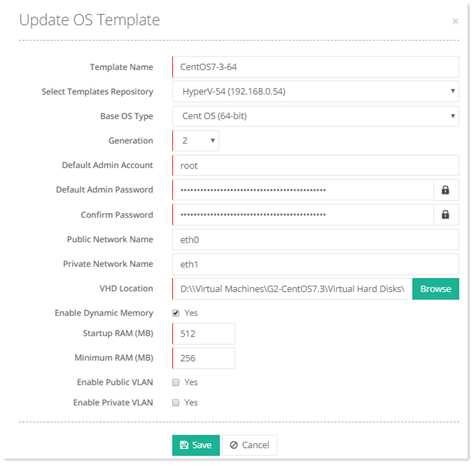
Now specify all the details which are related to your CentOS OSTemplate like its Generation, Template Size, root user and password etc. A sample of CentOS OSTemplate is given below just for example to give you an idea about the settings. These settings will differ according to the settings of your custom created OSTemplate for CentOS.
-