
| Product Documentation
Hybrid Control Panel (v10)
Adding a composite resource
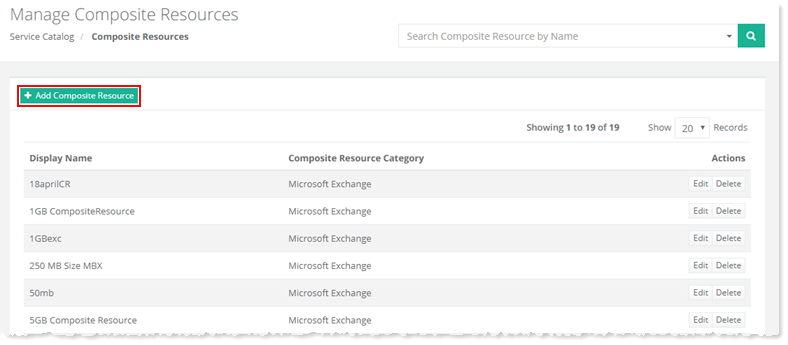
To add a composite resource, go to Service Catalog >> Composite Resources >> + Add Composite Resource and specify required information to proceed.
Fields marked in red are required fields and cannot be left empty.
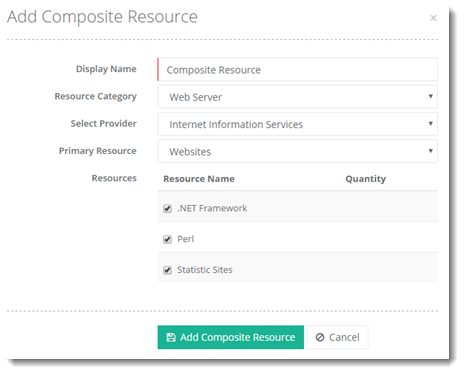
- Display Name: It is name of the Composite Resource.
- Resource Category: HC10 categorizes Composite Resources on the basis of main services offered for instance Web, Exchange, Skype for Business, SharePoint, IaaS etc. These services form the main categories for Composite Resources.
- Select Provider: The exact version of the service e.g. Exchange 2013 or Exchange 2016
- Primary Resource: The component of the resource which would determine the nature of the affiliated resources. If Primary Resource is User Mailboxes then its affiliated resources would be Mailbox Size, Incoming Message Size, Outgoing Message Size, Prohibit Send at etc.
- Resources: The affiliated resources.
All the primary resources and their affiliated resources can be viewed in the table below:
| Primary Resource | Affiliated Resources |
| Websites | .NET Framework PHP IP Based Domains Statistics Sites |
| Subdomains | .NET Framework PHP IP Based Domains Statistics Sites |
| User Mailboxes | Mailbox Size (MB) Incoming Message Size (MB) Outgoing Message Size (MB) Prohibit Send at (MB) Issue Warning at (MB) Maximum Recipients IMAP POP OWA/HTTP MAPI ActiveSync Deleted Item Retention Settings |
| Archive Mailboxes | Archive Mailbox Size (MB) |
| Distribution Lists | Incoming Message Size Limit (MB) |
| Mail Contacts | Mail Contact Receive Size (MB) Maximum Recipient |
| Resource Mailboxes | Mailbox Size (MB) Incoming Message Size (MB) Outgoing Message Size (MB) IMAP POP OWA/HTTP MAPI |
| Public Folders | Public Folder Size (MB) |
| Mailboxes (Non-Exchange) | Total Mailbox Size (MB) |
| SQL Server Databases | SQL Server LDF Size (MB) SQL Server MDF Size (MB) |
| SharePoint Sites |
SharePoint Users |
| Virtual Machines | CPU Cores RAM Size (MB) VHD Size (MB) |