| Product Documentation
Hybrid Control Panel (v10)
Managing SIP federated domains
Federation in Skype for Business server is the ability to communicate with users in other organizations. Using federation, Skype for Business users in one organization can call or send IM messages to people in other organizations. If federated partners are configured, users in separate organizations can communicate in real-time across network boundaries. One or more SIP domains can be configured as allowed federated partner domains for the federated partners. HC allows you to add and manage these SIP federated partner domains.
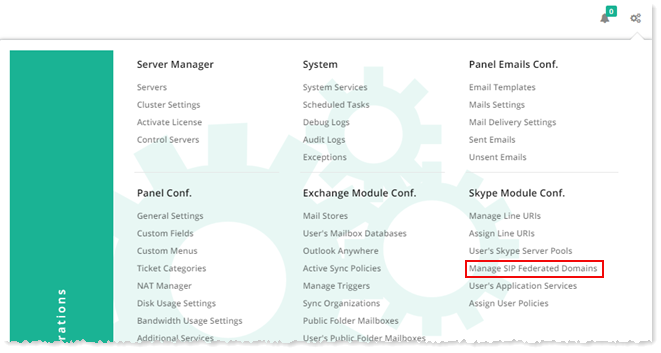
To manage SIP federated domains, from top right corner of your screen, click  and then go to Skype Module Configuration >> Manage SIP Federated Domains.
|
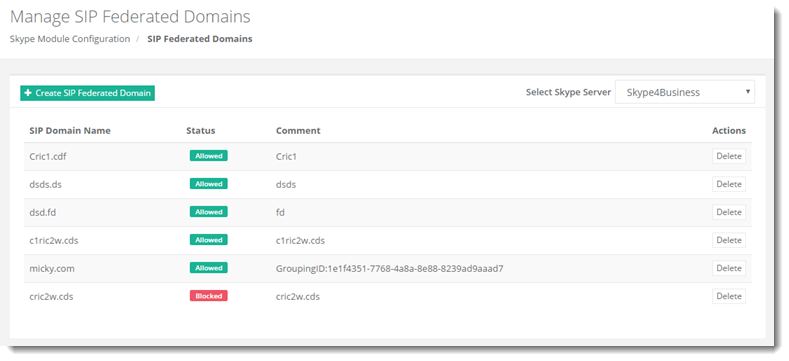
SIP Federated Domains page shows all the available SIP Federated Domains and additional information as:
|
Creating a SIP Federated Domain
To create a Skype SIP domain, click + Create SIP Federated Domain and specify required information.
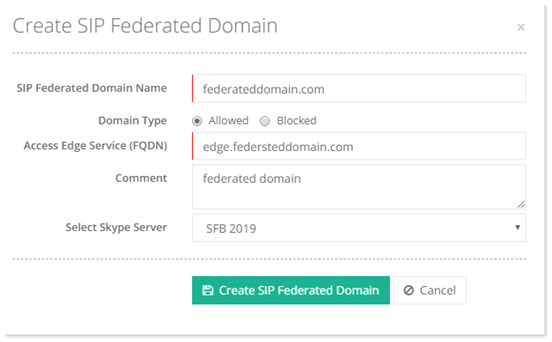
- SIP Federated Domain Name: It is the name of the SIP federated partner domain.
- Domain Type: Specific external domains can be allowed to federate with an organization. On the other hand specific domains can be blocked from federating with the organization. Therefore each domain can either be a part of an allowed domain list or the part of a blocked domain list. This field specifies whether the domain is allowed or blocked.
- Access Edge Service (FQDN): This is the FQDN or name of the server running the Access Edge service e.g. access.domain.com.
- Select Skype Server: It is the Skype for Business Front-End server where the SIP federated partner domains are created.
Deleting a SIP Federated Domain
To remove a domain, click Delete under Actions column.