
| Product Documentation
Hybrid Control Panel (v10)
Adding a Database Server
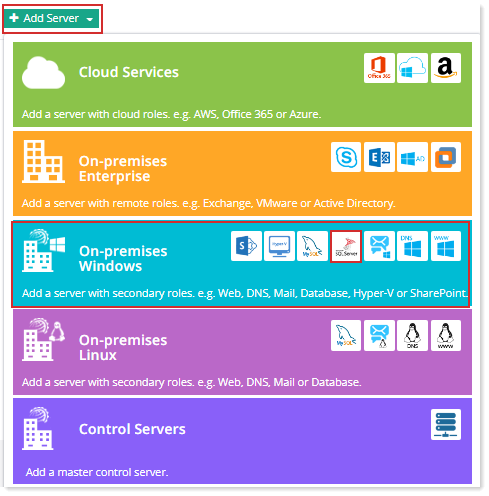
Prior to add a Database server, make sure you have enabled the server roles under Cluster Settings. If you have not configured it yet, please configure it now to proceed further.
HC10 supports Microsoft SQL Server and MySQL as database servers.
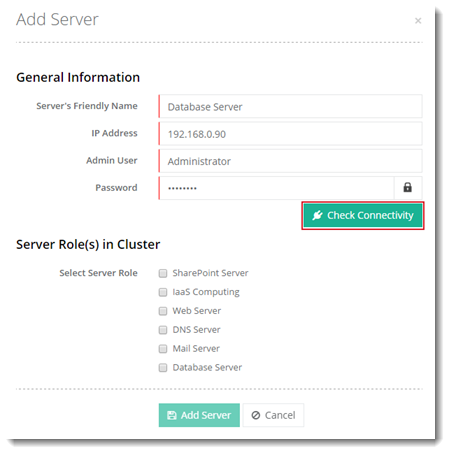
To add a database server, specify General Information and click Check Connectivity. Once you are connected successfully, only then you can add a database server.
Fields marked in red are required fields and cannot be left empty.
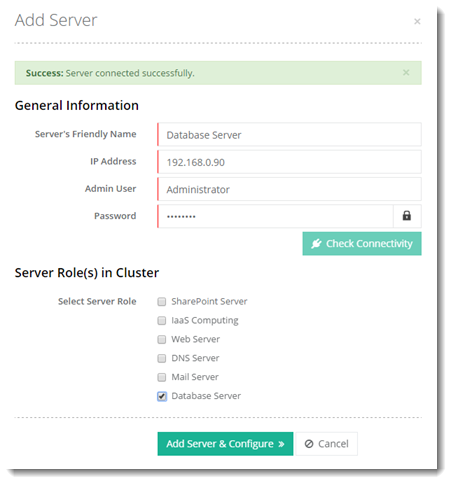
Click Add Server & Configure. Add SQL/MySQL instance(s) as required for Database Server.
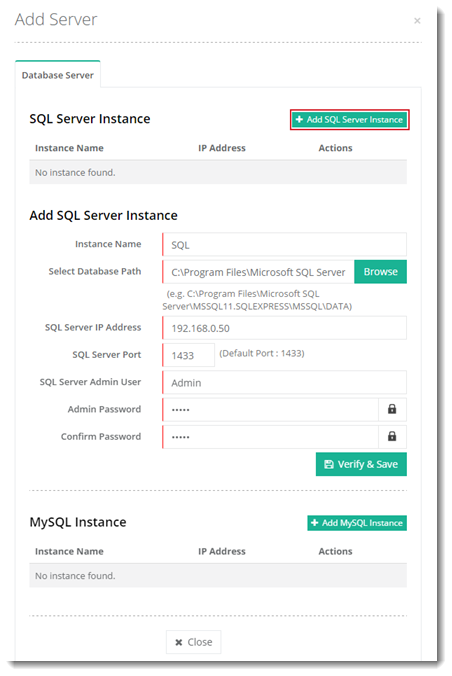
- SQL Server Instance: You may add more than one SQL Server instance through HC.
- Instance Name: Name of the SQL Server instance e.g. NAME\SQLEXPRESS
Hosting Controller also supports SQL Server Always On Availability Groups for high availability. To learn more, see How to configure Hosting Controller with SQL Server Always On.
Hosting Controller supports mysql_native_password plugin authentication with MySQL8.