
| Product Documentation
Hybrid Control Panel (v10)
Configuring Mail Delivery Settings
There are two methods HC10 utilizes to send out its reporting emails. The Direct Delivery method uses an HC component to send emails and utilizes a DNS server to resolve. The SMTP Delivery method makes use of the SMTP settings of a mail server to send emails.
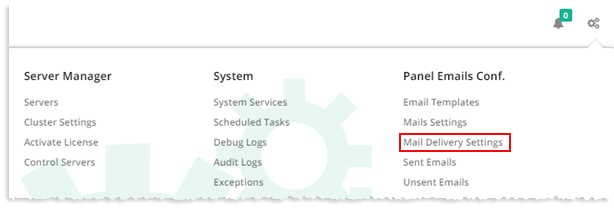
To configure mail delivery settings, from top right corner of your screen, click  and then go to Panel Emails Configuration >> Mail Delivery Settings.
Direct Delivery
In case Email Sending Method is selected as Direct Delivery, specify required information:
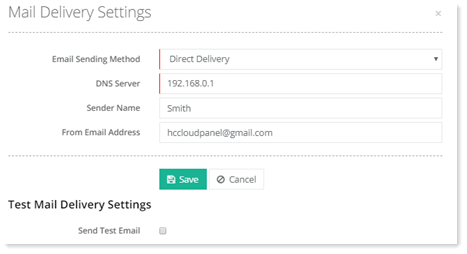
- Email Sending Method: The Direct Delivery method utilizes a DNS server to route mails.
- DNS Server: Specify the IP of the DNS server.
- Sender Name: Specify name of the sender. The name will display in the From field of the emails, if this field has a value.
- From Email Address: This is the address from which the recipients will receive emails.
SMTP Delivery
In case Email Sending Method is selected as SMTP Delivery, specify required information:
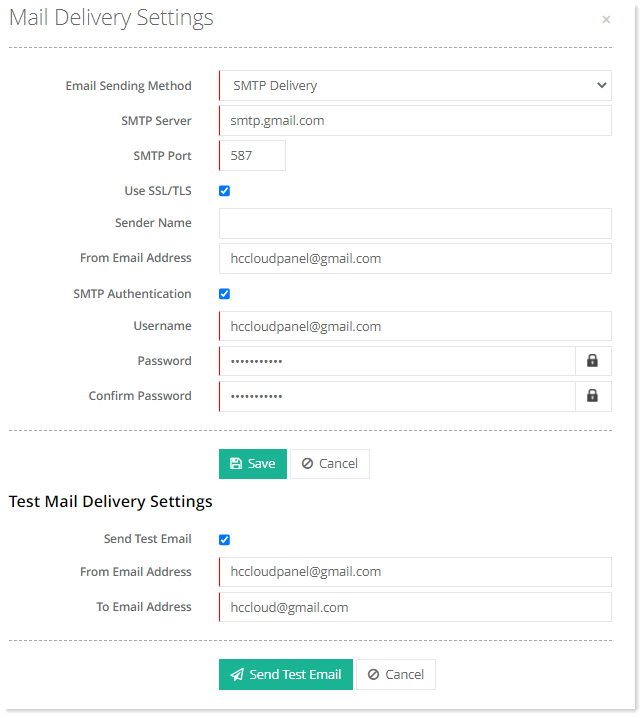
- Email Sending Method: The SMTP Delivery method makes use of the SMTP settings of a mail server.
- SMTP Server: It is the IP of the SMTP server.
- SMTP Port: Provide port of the SMTP server. This usually is 25.
- Use SSL/TSL: Select this check box if you want to send emails securely. Mails sent over an SSL connection are encrypted.
- Sender Name: Type name of the sender. The name will display in the From field of the emails, if this field has a value.
- From Email Address: This is the address from which the recipients will receive emails.
- SMTP Authentication: This option, if selected requires the mail server to authenticate emails. The user specified for sending emails has to identify itself and after successful authentication emails are transmitted.
- Username: The Username of the specified user that has to identify itself.
- Password: Password of the specified user that has to identify itself.
- Confirm Password: Re-type password.
Test Mail Delivery Settings
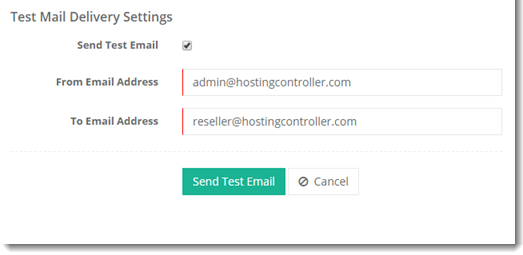
For Direct Delivery:
You can also test your mail delivery settings from Test Mail Delivery Settings option. Test mail can be sent in order to make sure that the mails are being delivered. Click Send Test Email check box and specify required information:
For SMTP
You can also test your mail delivery settings from Test Mail Delivery Settings option. Test mail can be sent in order to make sure that the mails are being delivered. Click Send Test Email check box and specify required information: